Alice Mail: Accessing Your Mailbox and Troubleshooting Connection Issues
To perform an Alice Mail login, go directly to the Alice Zimbra portal at https://zimbra.aliceadsl.fr/, then enter your full email address and password. However, some older addresses may still go through the Free webmail, depending on the path still offered by the service.
An inaccessible page does not necessarily mean that your account has been deleted. The proper approach is to distinguish the address used, the identification error, the browser, and any possible changes in the service, without sharing your credentials with an intermediary.
Table des matières
In brief
- 🔐 Direct access to Alice Zimbra goes through zimbra.aliceadsl.fr, to be checked before any entry.
- 📨 The classic webmail may be redirected to webmail.free.fr depending on the address and available path.
- 🧩 A connection refusal may come from a typo, a blocked account, the browser, or a service update.
- ⚠️ The creation of new addresses and the retention of old mailboxes must be confirmed on an official portal.
Quickly access Alice Mail securely
Direct access to Alice webmail is done from the Alice Zimbra portal identified by the address zimbra.aliceadsl.fr. This page usually requests the full mailbox address and the associated password, but accepted historical domains and access methods may evolve.
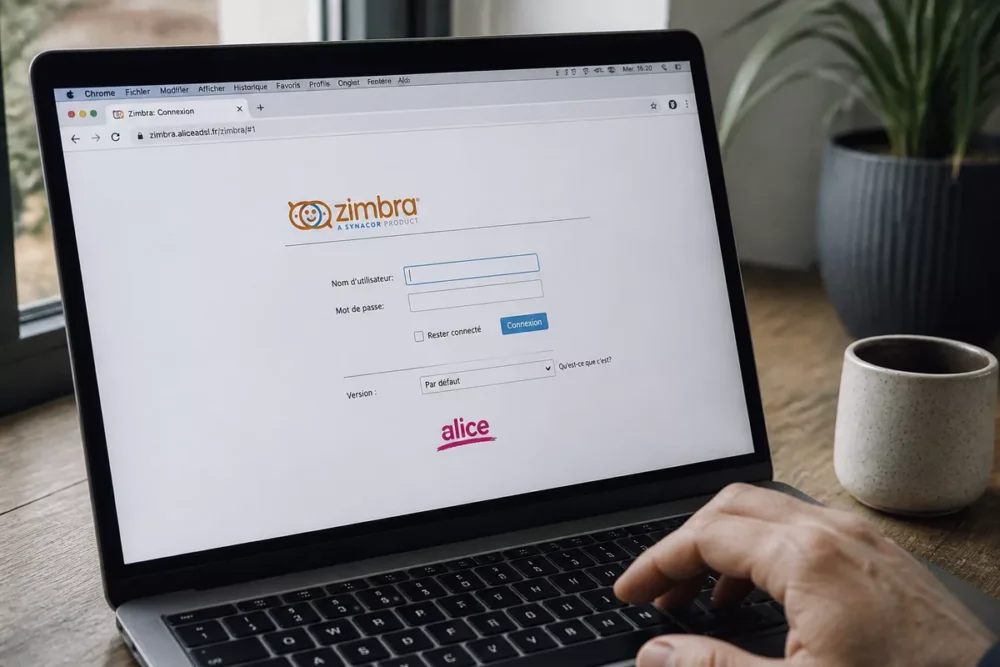
Verifying the site address must precede any entry of credentials. A fake page may reuse an operator’s logo and display an identical form while capturing the entered information. The address must use a secure connection in the browser and exactly match the expected domain.
Check the address before entering your credentials
The domain name displayed in the browser bar is the first check. An address containing added words, a subtle typo, an unusual redirection, or a domain unrelated to Alice must not be used for Alice Mail login.
- Open the official address directly rather than following a link received in an unexpected message.
- Avoid sponsored results offering urgent password recovery.
- Check the browser padlock and the exact domain before filling out the form.
- Keep operator communications or associated client access to verify service changes.
The Alice Zimbra portal displays several historical suffixes in its login interface. The visible list may vary depending on the offered path; therefore, use the address actually attached to your account without automatically replacing one domain with another.
How to log in to your Alice Mail mailbox?
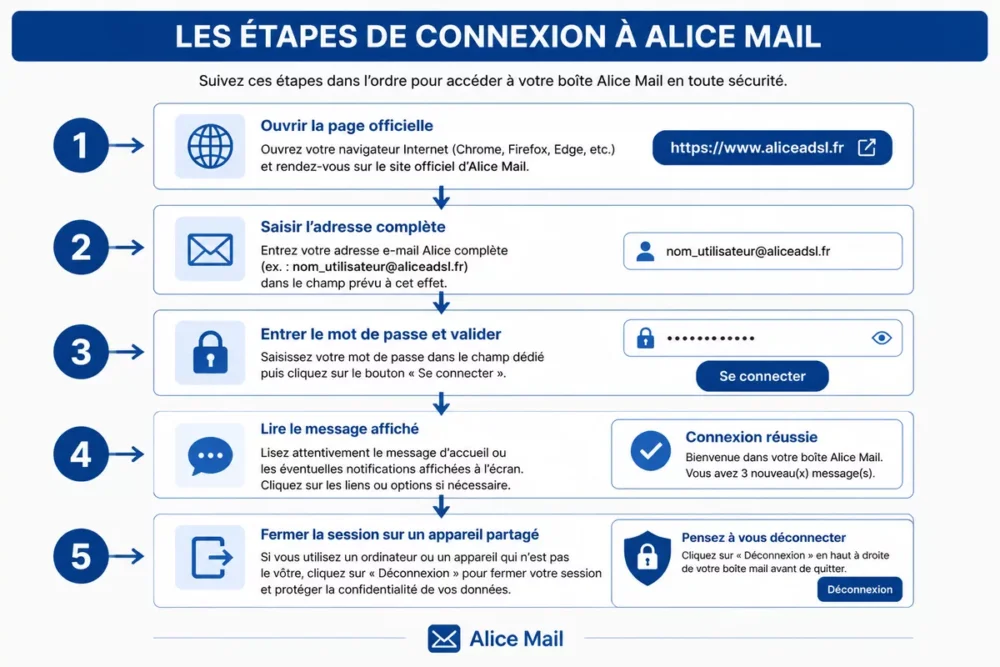
To log in, open the official page, prepare your full Alice Mail address, and enter the usual password. A stable internet connection and an up-to-date browser reduce technical errors, but they do not allow account recovery if verification methods are no longer accessible.
Necessary Information
An Alice Mail inbox is an email service associated with a historic address and an authentication mechanism specific to the account. The form may request the full address rather than just a username, especially when multiple domains are supported.
- The full email address or the identifier requested by the portal.
- The password associated with the concerned address.
- An accessible recovery method if additional verification is offered.
Login Steps
- Open directly the Alice Zimbra page or the official portal associated with your old address.
- Enter the full address, without any accidentally copied spaces.
- Enter the password, then submit the form.
- Read the displayed message before attempting again.
- Log out if you are using a public, family, or shared professional computer.
Rapid repeated attempts with a wrong password can complicate diagnosis. Note the exact text of the message, as “incorrect identifier,” “account blocked,” and “page unavailable” do not refer to the same cause.
Forgot Alice Mail Password or Account Blocked: What Solutions?
A forgotten Alice Mail password must be recovered only through the official procedure displayed by the portal. Before starting the reset, check the input, keyboard, and address used, as a simple error can produce the same result as a blocked account.
No serious procedure can guarantee the recovery of an old inbox if the verification methods have disappeared. Old addresses, inactive accounts, and services that have changed management may be subject to special conditions that must be confirmed by official support.
Check Simple Causes of a Denial
Keyboard errors remain frequent when logging into Alice Mail, especially when the password is copied from a manager or an old document. Manual entry sometimes helps rule out an invisible space or outdated data.
- Check the Caps Lock key and keyboard language.
- Remove spaces placed before or after the address.
- Verify that the address corresponds to the desired inbox.
- Try manual entry if the browser has saved old information.
- Compare the error message on another up-to-date browser.
Start an Official Recovery
Use the “Forgot Password?” link when it is present on the official page. The procedure may ask for a recovery address or verification information, but the absence of these elements may prevent any automatic reset.
A third-party site asking for your password, a document copy, or payment to “unlock” Alice Mail should be approached with caution. Recovery must start on the official portal, then continue with support recognized by the operator.
Is Alice Mail Still Working? Diagnosing an Inaccessible Page
An inaccessible Alice Mail page can result from a local problem, temporary unavailability, or a lasting service evolution. Diagnosis should start with the browser and network, then rely on official communications before concluding about the closure or migration of an address.
A redirection to Free webmail and direct access to Alice Zimbra correspond to two different paths: do not automatically interpret them as account closure.
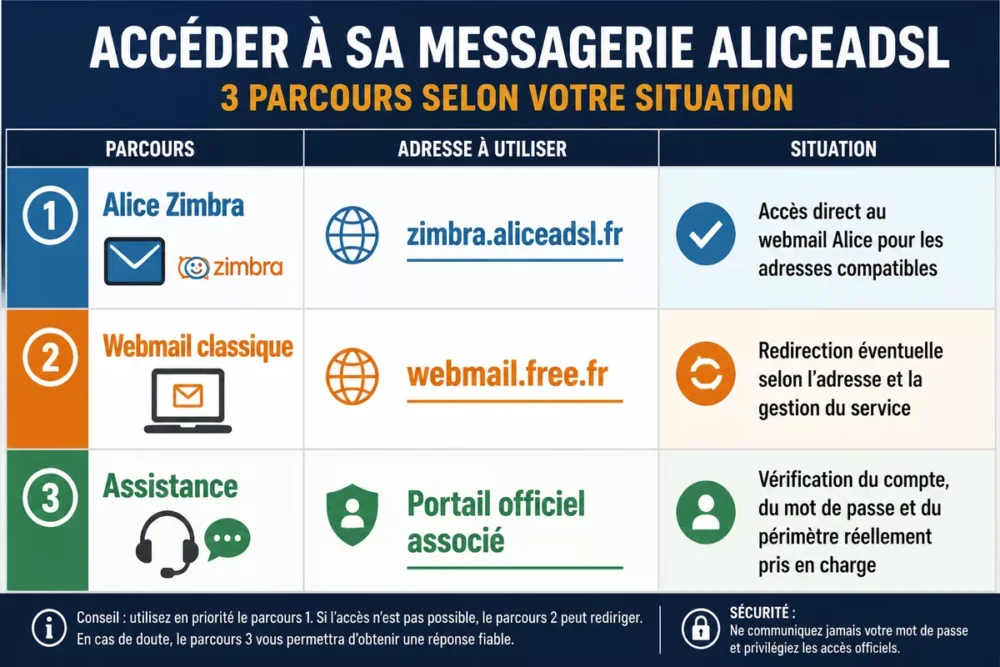
Available information distinguishes direct access to Alice Zimbra from the classic webmail which may redirect to webmail.free.fr. Any redirection alone does not prove that all Alice inboxes are handled the same way.
| Path | Address to Check | Situation to Distinguish |
|---|---|---|
| Alice Zimbra | zimbra.aliceadsl.fr | Direct access to Alice webmail for compatible addresses |
| Classic Webmail | webmail.free.fr | Possible redirection depending on the address and service management |
| Support | Associated official portal | Verification of the account, password, and the actual scope supported |
When the login page does not open
A step-by-step test helps avoid unnecessarily changing account settings. Start by refreshing the page, then try a private window or another browser before modifying the device configuration.
- Check that other websites open correctly.
- Refresh the Alice Mail page and verify the entered address.
- Try a private browsing window or a recent browser.
- Clear the cache if an old page or a redirect loops.
- Test another network, for example a mobile hotspot.
- Note the error message before contacting support.
Incorrect device date and time can also disrupt secure connections. Browser extensions that filter scripts or login windows can be temporarily disabled to perform a test, then reactivated once the diagnosis is complete.
When the service or the old address seems to have changed
The creation of new Alice addresses, the retention of old mailboxes, and a possible migration should not be assumed without official dated confirmation. Information found on a forum or in an old article may describe a situation that is no longer valid in 2026.
The inability to connect is not enough to conclude that an Alice address has been deleted: one must distinguish the account, the password, the portal, and the availability of the service.
Check the operator’s portals and the associated customer area before creating a replacement address. A new address does not automatically retrieve old messages, contacts, or filtering rules from an Alice mailbox.
Accessing Alice Mail on phone or mail software
On phone or tablet, the official web access remains the safest choice when the compatibility of an app is not confirmed. An unknown app may ask for the password without providing clear guarantees about its publisher, permissions, or data protection.
Access from a smartphone or tablet
Open the device’s browser and enter the official address directly rather than following a link received by message. Alice Mail login on mobile then follows the same principle as on a computer, with increased vigilance if the device is lent or shared.
- Use an up-to-date browser and lock your phone.
- Avoid apps whose publisher is not clearly identified.
- Do not validate an urgent request for credentials received by email.
- Log out after checking on a device that does not belong to you.
Configuration in mail software
Outlook, Thunderbird, or Apple Mail may require separate incoming and outgoing settings. The IMAP or POP protocols, server names, ports, and encryption must be confirmed by current official documentation before any configuration.
A setting found on an old forum may work for another period or domain, but not suit your Alice address. Do not disable connection protections to bypass an error and never enter the password into software whose origin is not identifiable.
Securing your Alice Mail account after login
The security of an old Alice address depends mainly on controlling the still available accesses and quickly detecting fraudulent messages. A password reused on multiple services increases the consequences of a leak from another account.
- Choose a unique, long, and hard-to-guess password.
- Enable additional protections if the service actually offers them.
- Check the site’s domain before each login from an external link.
- Change the password from the official portal if you suspect anything.
- Close open sessions on non-personal devices.
Reflexes Against Phishing
A message requesting urgent confirmation, an allegedly immediate suspension, or a payment to keep the mailbox must be independently verified. Do not respond with your password and do not use the provided link if its actual domain is uncertain.
Access the official portal directly, then look for equivalent information in the client area or support section. In case of probable compromise, keep the message, change the password from a secure page, and report the attempt through the channels offered by the operator.
Key Points
- 🔗 Use zimbra.aliceadsl.fr directly to test access to Alice Zimbra.
- 🧭 Distinguish Alice Zimbra from the classic webmail which may redirect to Free.
- ⌨️ Check the keyboard, the full address, and the browser before starting a recovery.
- 🛡️ Never provide your password to a site or intermediary.
- 📅 Confirm in 2026 the status of old addresses and support procedures on an official portal.
Official Sources
The status of historical mailboxes, possible redirections, and recovery procedures must be confirmed on the official pages consulted. These links alone do not constitute proof of a migration or compatibility rule.
Frequently Asked Questions
How to quickly access Alice Mail?
Open https://zimbra.aliceadsl.fr/ directly and enter your full address with its password. If your old route redirects to Free webmail, verify that the redirection comes from an official portal.
How to recover an Alice Mail account?
Use the official “forgot password” link when it is still offered. Recovery may fail if the backup address or verification information is no longer accessible.
Can a new Alice Mail address still be created?
The availability of creating a new address must be checked on the official route at the time of your request. Old addresses and new registrations do not necessarily follow the same conditions.
Why does Alice Mail reject my password?
A typo, Caps Lock key, an added space, or an incorrect address can explain the rejection. If the entry is correct, try another browser and use only the official recovery procedure.
What to do if the official Alice Mail page is inaccessible?
Check your internet connection, refresh the page, try another browser, then another network. Note the error message and consult official communications before concluding that the service is closed.
Can Alice Mail be used on a phone?
Yes, access via mobile browser can be used when the official portal is available. An app or mail software should only be configured with confirmed settings and a clearly identified publisher.